
🦀 Rust for Beginners — A Crash Course That Actually Makes Sense
Written for people who are new to Rust, or coming from C, C++, or JavaScript.
Why Rust?
Rust gives you the speed of C/C++ but without the classic nightmare of memory bugs — no dangling pointers, no use-after-free, no garbage collector slowing you down.
If you come from JavaScript, Rust will feel strict at first. If you come from C/C++, you'll recognize a lot of ideas — but Rust enforces them at compile time so you can't shoot yourself in the foot. Installation:
curl --proto '=https' --tlsv1.2 -sSf https://sh.rustup.rs | sh
1. Variables — Immutable by Default
In Rust, variables are immutable by default, which means once you assign a value, you cannot change it unless you explicitly allow it.
let x = 5;
x = 10; // Error
This might feel restrictive at first, especially if you’re coming from JavaScript or C++. But this design helps prevent accidental changes in your program.
To make a variable changeable, you use the mut keyword:
let mut y = 5;
y = 10; // Works
Why does Rust do this?
Because most bugs in programs come from unexpected changes in variables. By making immutability the default, Rust forces you to think before changing data.
So the rule is simple:
- Use
let→ value cannot change - Use
let mut→ value can change
2. Data Types
Rust divides data types into two main categories:
Scalar Types (Single Value)
These store one value at a time.
- Integers: whole numbers
Example:
i32,u64 - Floating point: decimal numbers
Example:
f32,f64 - Boolean: true or false
- Character: single Unicode character
- String slice (
&str): reference to a string
Example:
let age: i32 = 25;
let pi: f64 = 3.14;
let is_valid: bool = true;
let ch: char = 'A';
let msg: &str = "Hello";
Compound Types (Multiple Values)
These store multiple values together.
- Array → fixed size, same type
- Tuple → fixed size, different types allowed
- String → growable text
- Vector (
Vec) → dynamic array
Example:
let arr = [1, 2, 3];
let tup = (1, 2.5, true);
let s = String::from("hello");

let mut v = vec![1, 2, 3];
v.push(4);
Key idea:
- Scalar = single value
- Compound = collection of values
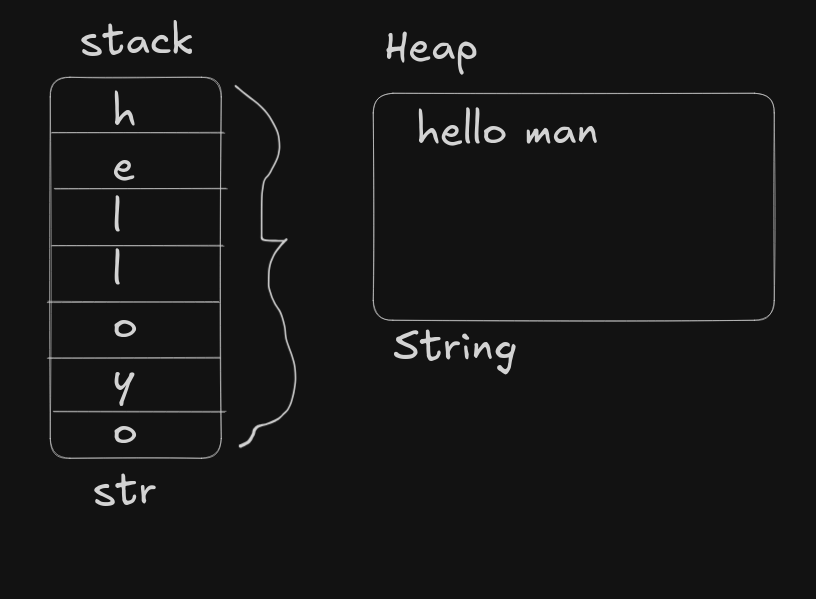
3. &str vs String
This is one of the most important concepts in Rust.
&str (String Slice)
- Fixed size
- Cannot grow
- Usually stored in program memory
- Does not own the data
let s1 = "hello";
Here, s1 is just pointing to some text already stored somewhere.
String
- Growable
- Stored on the heap
- Owns the data
- Can be modified
let mut s2 = String::from("hello");
s2.push_str(" world");
Main Difference
&str→ just a reference (lightweight, read-only)String→ full ownership (modifiable, dynamic)
Think like this:
&str→ borrowed textString→ owned text
4. Tuples
A tuple allows you to store multiple values of different types in a single variable.
let person = (25, "Alice", true);
Here:
25→ integer"Alice"→ string slicetrue→ boolean
You can access values using index:
println!("{}", person.0);
Or unpack them:
let (age, name, active) = person;
println!("{} is {}", name, age);
Tuples are useful when:
- You want to return multiple values from a function
- You want to group related data without creating a struct
5. Functions
Functions in Rust are similar to other languages but have a clean return style.
fn add(a: i32, b: i32) -> i32 {
    a + b
}
Notice:
-> i32means the function returns an integer- No
returnkeyword needed - No semicolon at the end
If you add a semicolon, it won’t return:
fn wrong(a: i32, b: i32) -> i32 {
    a + b; // This becomes a statement, not a return
}
Correct version:
fn correct(a: i32, b: i32) -> i32 {
    return a + b;
}
Another example
fn greet(name: &str) {
    println!("Hello, {}", name);
}
Functions can:
- Take parameters
- Return values
- Work with ownership rules (important later)
6. Shadowing
Shadowing means creating a new variable with the same name.
let x = 5;
let x = x + 1;
let x = "now a string";
Each let creates a new variable.
Why use shadowing?
- You can change the type:
let x = "42";
let x: i32 = x.parse().unwrap();
- You keep the same variable name but update meaning step by step
Shadowing vs mut
Some text here.
| Feature | mut | Shadowing |
|----------------------|-------|------------|
| Change value | Yes | Yes |
| Change type | No | Yes |
| Creates new variable | No | Yes |
More text here.Example:
let mut x = 5;
x = 10; // same variable

let x = 5;
let x = 10; // new variable
7. Ownership — The Core of Rust
Ownership is the main idea that makes Rust different from most languages. Instead of using a garbage collector or manual memory management, Rust uses a set of rules that the compiler checks at compile time.
Ownership Rules
- Every value has exactly one owner
- Only one owner at a time
- When the owner goes out of scope, the value is dropped
What does "owner" mean?
When you create a variable, it owns the data it holds.
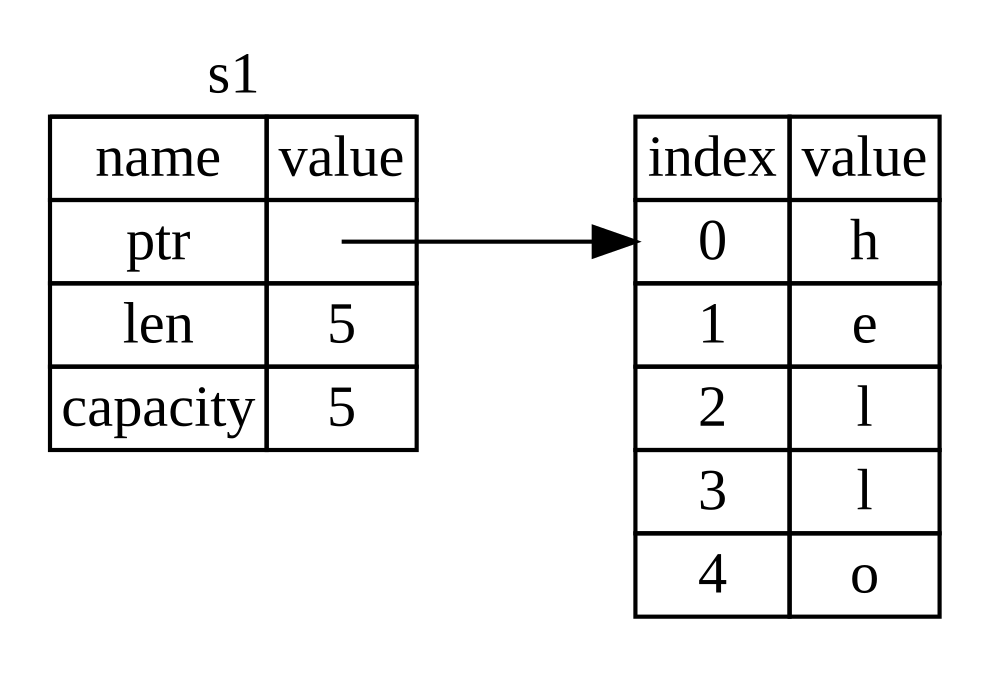
let s = String::from("hello");
Here:
sis the owner"hello"is stored in heap memoryscontrols when that memory is freed
Scope and Drop
{
    let s = String::from("hello");
} // s goes out of scope here → memory is freed
When s leaves the scope, Rust automatically frees the memory. No need for free() or garbage collection.
Move — Transferring Ownership
When you assign a heap-allocated value to another variable, ownership is transferred (moved).
let s1 = String::from("hello");
let s2 = s1;
Now:
s2owns the datas1is no longer valid
println!("{}", s1); // Error
Why does Rust do this?
Because if both variables tried to free the same memory, it would cause a double free error. Rust prevents this by allowing only one owner.
Copy — For Simple Types
For simple types like integers, Rust copies instead of moving.
let x = 5;
let y = x;
Both x and y are valid.
Why?
Because these types are stored on the stack and are cheap to copy.
Common Copy types:
- integers (
i32,i64) - floats (
f32,f64) - boolean (
bool) - char
Ownership and Functions
Passing a value to a function also follows ownership rules.
fn take_ownership(s: String) {
    println!("{}", s);
}

let my_str = String::from("hello");
take_ownership(my_str);

println!("{}", my_str); // Error
Ownership moved into the function, and once the function ends, the value is dropped.
Returning Ownership
You can return ownership back:
fn give_back(s: String) -> String {
    s
}

let my_str = String::from("hello");
let my_str = give_back(my_str);
This works, but passing values back and forth is not always convenient. That’s where borrowing helps.
8. Borrowing — Using Data Without Taking Ownership
Borrowing allows you to use a value without taking ownership of it.
Instead of passing the value, you pass a reference using &.
Immutable Borrow (Read Only)
fn print_value(s: &String) {
    println!("{}", s);
}

let my_str = String::from("hello");
print_value(&my_str);

println!("{}", my_str); // Still valid
Here:
&my_stris a reference- The function only borrows it
- Ownership stays with
my_str
Why Borrowing?
Without borrowing, you would have to return values every time, which becomes messy.
Borrowing lets you:
- Avoid unnecessary copies
- Keep ownership in one place
- Write cleaner code
Mutable Borrow (Write Access)
If you want to modify the value, use a mutable reference.
fn change(s: &mut String) {
    s.push_str(" world");
}

let mut my_str = String::from("hello");
change(&mut my_str);

println!("{}", my_str);
Important:
- The original variable must be
mut - The reference must be
&mut
Borrowing Rules
Rust enforces strict rules to avoid data races.
- You can have multiple immutable references
let s = String::from("hello");

let r1 = &s;
let r2 = &s;

println!("{} {}", r1, r2);
- Only one mutable reference at a time
let mut s = String::from("hello");

let r1 = &mut s;
let r2 = &mut s; // Error
- Cannot mix mutable and immutable references
let mut s = String::from("hello");

let r1 = &s;
let r2 = &mut s; // Error
Why these rules?
To prevent:
- Data races
- Unexpected changes
- Invalid memory access
Rust enforces these rules at compile time, so your program is safe before it even runs.
Dereferencing
When you have a mutable reference and want to change the actual value, you use *.
let mut x = 5;
let y = &mut x;

*y = 10;

println!("{}", x);
Here:
yis a reference*ymeans "go to the actual value"
Key Idea
- Ownership → who controls the data
- Borrowing → temporary access without ownership
- References (
&) → how borrowing is implemented
Once you understand ownership and borrowing, most of Rust starts making sense.
9. Dangling References
A dangling reference is a reference that points to memory which has already been freed. In languages like C or C++, this can compile and cause runtime bugs. Rust does not allow this at all.
fn dangle() -> &String {
    let s = String::from("hello");
    &s // Error
}
Why is this wrong?
sis created inside the function- When the function ends,
sis dropped - Returning
&smeans returning a reference to memory that no longer exists
Rust catches this at compile time.
Correct approach
Return ownership instead of a reference:
fn no_dangle() -> String {
    let s = String::from("hello");
    s
}
Now the value is moved out safely, and nothing is pointing to invalid memory.
10. Arrays vs Vec
Rust provides two ways to store multiple values of the same type.
Array (Fixed Size)
let arr: [i32; 4] = [10, 20, 30, 40];
println!("{}", arr[0]);
- Size is fixed at compile time
- Stored on the stack
- Faster and simple
- Cannot grow or shrink
Vector (Dynamic Size)
let mut v: Vec<i32> = vec![10, 20, 30];

v.push(40);
v.pop();
- Size can change at runtime
- Stored on the heap
- Can grow or shrink
- More flexible
Key Difference
- Array → fixed, stack memory
- Vec → dynamic, heap memory
Use arrays when size is known and fixed. Use vectors when size can change.
11. Scalar Data Types — Full View
Rust provides different scalar types for different use cases.
Integers
- Signed:
i8,i16,i32,i64 - Unsigned:
u8,u16,u32,u64
let a: i32 = -10;
let b: u32 = 10;
Floating Point
let x: f32 = 3.14;
let y: f64 = 2.718;
Boolean
let is_valid: bool = true;
Character
let ch: char = 'A';
let emoji: char = '🦀';
Rust char supports Unicode, so it can store more than just ASCII.
String Slice
let s: &str = "hello";
A string slice is a reference to text, not an owned value.
12. Control Flow — Loops and Match
Control flow decides how your program runs.
Loops
Infinite loop
loop {
    println!("running");
    break;
}
While loop
let mut n = 0;

while n < 5 {
    n += 1;
}
For loop
for i in 0..5 {
    println!("{}", i);
}
Iterating over collections
let nums = vec![10, 20, 30];

for n in &nums {
    println!("{}", n);
}
Match (Pattern Matching)
match is similar to switch but safer and more powerful.
let number = 3;

match number {
    1 => println!("one"),
    2 => println!("two"),
    3 => println!("three"),
    _ => println!("other"),
}
Match returning values
let score = 85;

let grade = match score {
    90..=100 => "A",
    80..=89 => "B",
    70..=79 => "C",
    _ => "F",
};

println!("{}", grade);
Key points:
- All cases must be handled
- No fall-through like in C/C++
- Can return values
13. Call by Value vs Call by Reference
Rust makes this distinction very clear using ownership and borrowing.
Call by Value
A copy (or move) is passed into the function.
fn double(x: i32) -> i32 {
    x * 2
}

let a = 5;
let b = double(a);

println!("{}", a);
Here:
ais copied- Original value is still usable
Call by Reference
A reference is passed instead of ownership.
fn print_len(s: &String) {
    println!("{}", s.len());
}

let name = String::from("Alice");
print_len(&name);

println!("{}", name);
Here:
- Function borrows the value
- Ownership stays with the original variable
Conclusion
Rust may feel strict when you start, especially with concepts like ownership and borrowing. But these rules are the reason Rust programs are safe and reliable.
Instead of finding memory bugs at runtime, Rust forces you to fix them at compile time. This saves a lot of debugging effort later.
To summarize the key ideas:
- Variables are immutable by default, which reduces unexpected changes
- Data types are clearly defined and safe
- Ownership ensures memory is managed without a garbage collector
- Borrowing allows safe access without transferring ownership
- References prevent unnecessary copying
- Rust does not allow invalid memory access like dangling references
- Vectors and arrays give flexibility in handling collections
- Control flow is simple but powerful, especially with
match
The learning curve might seem high in the beginning, but once you understand these fundamentals, writing Rust becomes much more natural.
The main goal of Rust is simple: write fast programs that are also safe. Once you get used to its rules, you will notice fewer bugs and better control over your code.